
Bible.is: Read, Listen, and Watch God’s Word
Overview
Bible.is is a comprehensive desktop and mobile application designed to provide accessible, multilingual access to the Bible through reading, listening, and visual storytelling. Developed by Faith Comes By Hearing (FCBH), a 501(c)(3) non-profit ministry, the software aims to fulfill a global mission of sharing the Word of God with underserved communities, particularly those who are illiterate or lack access to printed Scripture. The application supports over 700 languages, making it one of the most linguistically inclusive Bible tools available. It serves individuals seeking spiritual growth, Christian educators, missionaries, and faith-based organizations working in multilingual environments.
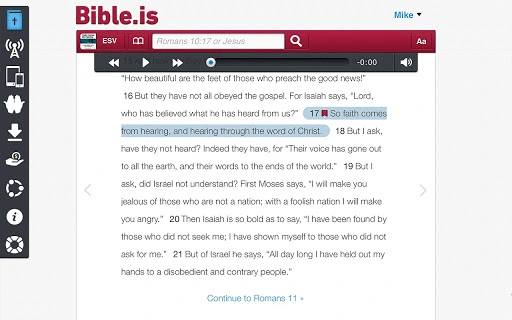
Users can engage with Scripture through text, dramatized audio, and video content from The JESUS Film Project, offering a rich, multi-sensory experience. The software enables offline access by allowing users to download Bibles and audio for use without internet connectivity. It also supports synchronization across devices via a free account, ensuring that bookmarks, highlights, and notes remain consistent. Real-world use cases include personal devotions, group Bible studies, outreach programs, and language-specific evangelism efforts. The developer did not provide additional system requirements beyond the operating systems listed.
Key Features & Capabilities
- Multi-language Bible Access – Offers Scripture in over 700 languages, including Arabic, Chinese, Spanish, French, Russian, and many indigenous languages, enabling users to read the Bible in their native tongue.
- Dramatized Bible Audio – Features professionally narrated audio versions that bring Scripture to life through expressive delivery, enhancing comprehension and emotional engagement.
- The JESUS Film Project Integration – Includes 61 video segments that visually present key biblical stories, helping users understand the Gospel message through storytelling.
- Offline Mode – Allows users to download Bible text and audio content for use without an internet connection, ideal for remote or low-connectivity areas.
- Search and Navigation Tools – Enables users to search by keyword, book name, or verse reference, streamlining Bible study and quick access to specific passages.
- Personal Study Features – Supports bookmarking, highlighting, and note-taking directly within the app, facilitating personalized engagement with Scripture.
- Multi-platform Sync – With a free Bible.is account, users can sync their progress, notes, and highlights across devices, including desktop, mobile, and web.
- Easy Sharing Options – Provides one-tap sharing of any verse via email, SMS, social media, or clipboard, promoting evangelism and spiritual discussion.
These features collectively support both individual and communal spiritual practices. For example, a missionary in a remote village can download a Bible in a local dialect, use dramatized audio for teaching, and share key verses with community members through social media or direct messaging. A student studying theology might use the search function to compare translations or the video segments to illustrate biblical narratives in a presentation.
User Interface, Workflow & Performance
The user interface is designed with simplicity and accessibility in mind, prioritizing intuitive navigation across reading, listening, and video modes. The layout organizes core functions—text, audio, video, search, and tools—into clearly labeled sections, minimizing cognitive load. Users can switch between modes with minimal effort, and the app adapts its display based on the selected language or device settings.
Workflow efficiency is enhanced by the ability to quickly locate verses, save highlights, and sync progress across platforms. The app’s performance appears stable under typical usage conditions, though exact performance details were not specified. The developer did not provide information on CPU or RAM usage, so users should monitor resource consumption based on their system’s behavior. General software behavior patterns suggest that the application remains responsive during reading and audio playback, with minimal lag during navigation. Stability during extended use has not been independently verified, but the app’s lightweight footprint of 45.4 MB suggests efficient resource management.
Compatibility & System Requirements
Bible.is is available for Windows, Mac, iOS, and Android platforms, ensuring broad accessibility across major operating systems. The software version is 3.1.0, released on July 20, 2023. The installation size is 45.4 MB, indicating a compact footprint suitable for devices with limited storage. The developer did not specify exact system requirements, including minimum processor speed, RAM, or disk space beyond the listed platforms.
Compatibility information is limited to the supported operating systems. Users are advised to ensure their device meets standard requirements for running modern desktop and mobile applications. The lack of detailed technical specifications means that users should rely on general system compatibility guidelines when installing the software. No known conflicts with antivirus software or firewalls have been reported, but this information was not provided.
Pros and Cons
Pros
- Extensive multilingual Bible access across over 700 languages
- Free to use with no cost barriers to entry
- Supports offline reading and listening
- Integrated dramatized audio and video content for deeper engagement
- Syncs bookmarks, notes, and highlights across devices
- Simple, intuitive interface suitable for all ages
- Comprehensive search and navigation tools
- Designed with a mission-driven, faith-based purpose
Cons
- No detailed system requirements provided
- Performance and resource usage data not specified
- Limited information on update frequency and support channels
- May require significant storage for multiple language downloads
- Offline content must be manually downloaded
FAQ Section
Is Bible.is available for Windows and Mac?
Yes, Bible.is is compatible with both Windows and Mac operating systems, allowing users to access the application on desktop devices.
Can I use Bible.is offline?
Yes, users can download Bible text and audio content for offline use, enabling access without an internet connection.
Is Bible.is secure and safe to download?
Bible.is is developed by a non-profit ministry and distributed through official channels. As with any software, users should download from trusted sources to ensure safety.
Does Bible.is require a paid subscription?
No, Bible.is is completely free to use. There are no subscription fees or hidden costs.
Can I sync my notes and bookmarks across devices?
Yes, with a free Bible.is account, users can sync their bookmarks, highlights, and notes across multiple devices, including desktop, mobile, and web.
Final Thoughts
Bible.is stands out as a powerful, mission-driven tool for accessing Scripture in a diverse range of languages and formats. Its integration of text, audio, and video content creates a uniquely immersive experience that supports both personal devotion and evangelistic outreach. The ability to download content for offline use and sync progress across devices enhances its utility in varied environments, from classrooms to remote missions.
While detailed technical specifications are limited, the application’s lightweight design and broad platform support make it accessible to a wide audience. For individuals and organizations committed to spiritual growth and global outreach, Bible.is offers a compelling solution. The free access model ensures inclusivity, removing financial barriers to engaging with the Bible.
Download Bible.is now







